The tracker: a beat, a bass line and an arpeggio
Raster is a tracker in the tradition of the Dirtywave M8, and its instruments are the synthesizer's own modules. This page is the whole of how to use it: what the seven screens are, which key does what, a tutorial that writes a kick, a hi-hat, a bass line and an arpeggio from an empty song, and how the result gets into the rack.
On this page
- What it is
- The seven screens
- The keys
- Tutorial: a beat, a bass line and an arpeggio
- The effect columns
- Saving, sharing and files
- Into the rack
- Differences from the M8
What it is
A tracker is a sequencer you type into. Instead of drawing notes on a timeline you write them in a grid, one row per sixteenth note, and every row can carry a note, a velocity, an instrument and up to three effect commands. The M8's way of arranging that grid is the one this borrows: a phrase is sixteen rows, a chain is a list of phrases, and the song is eight columns of chains, one per track. You move down into a thing to edit it and back up out of it when you are done.
What is not the M8's is the sound. An instrument here is a module from the
synthesizer at /app/ — MACRO,
COMPLEX, BASSLINE, BASS, MODAL,
STRING, KICK or the eight-voice DRUMS kit
— with every control its panel has there. Nothing is sampled. And because an
instrument is a rack module, a song written here can be dropped into a patch and
played through the rack's filters, envelopes and effects.
The seven screens
The map, which the footer of the tracker always shows, is the M8's, with one screen added:
PROJECT
   ↑
SONG · PATTERN › CHAIN › PHRASE › INSTRUMENT
                    ↓
                  MIXER
Shift+→ goes into whatever is under the cursor and Shift+← comes back out; Shift+↑ and Shift+↓ reach PROJECT and MIXER. Enter, Escape and Tab do the same three things for anybody who arrived from a spreadsheet, and the tabs above the grid are clickable.
PATTERN
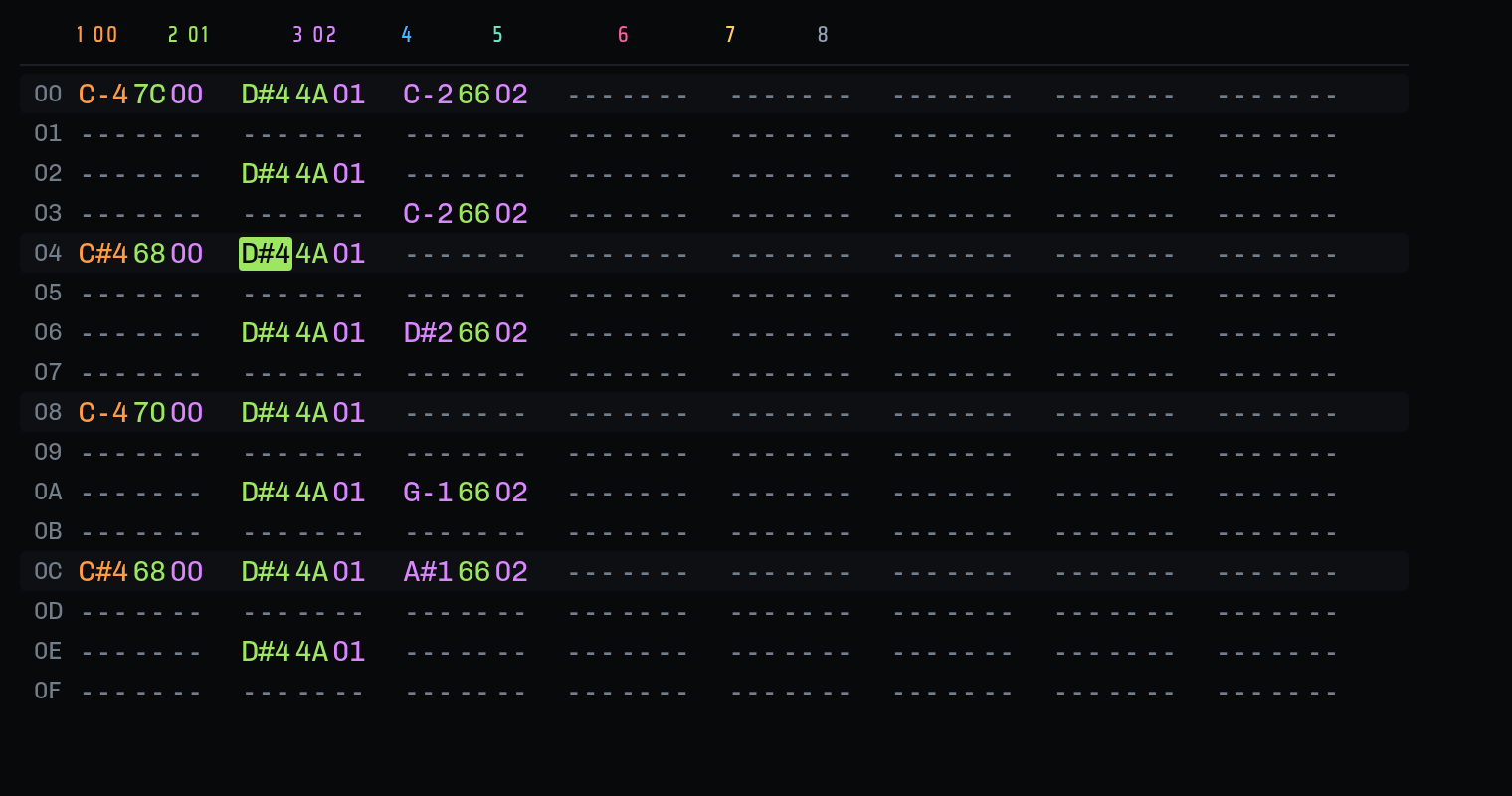
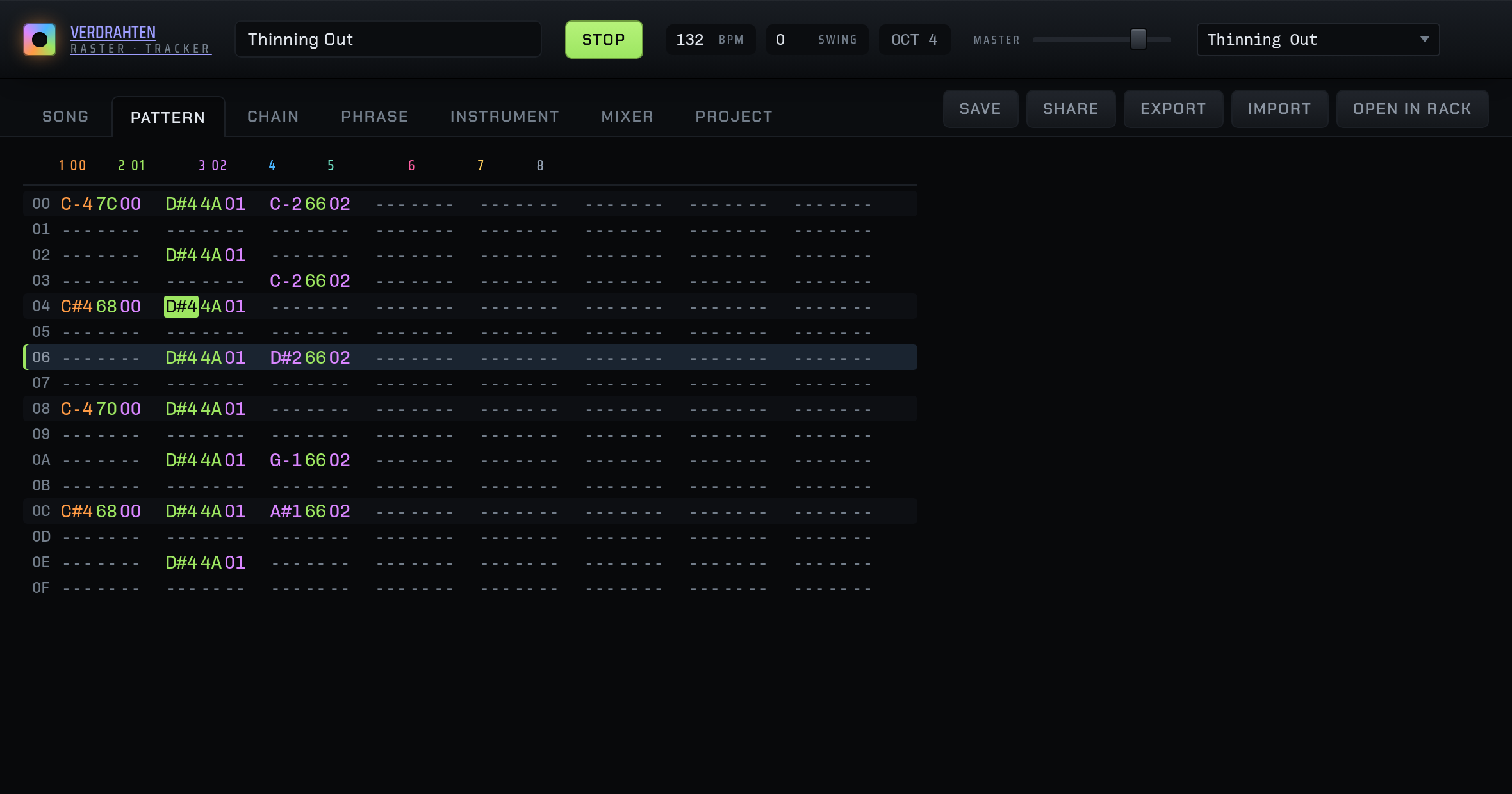
The screen the M8 does not have, and the reason is its 320×240 panel: with that much room a tracker can only show one track at a time. A browser window has the room, so this is one bar of all eight tracks at once, which is how a beat and a bass line and a line over the top actually get written — against each other rather than one at a time.
It is not a separate kind of data. Each column group is the phrase that track plays at this point in the song, so anything typed here is in the phrase, and Enter drops into the PHRASE screen for that track when you want the effect columns. Typing into a track that has no chain or phrase yet makes them: the note is the gesture and the bookkeeping happens underneath. Alt+↑/↓ is the previous or next bar of the chain and Alt+←/→ the previous or next song row.
SONG
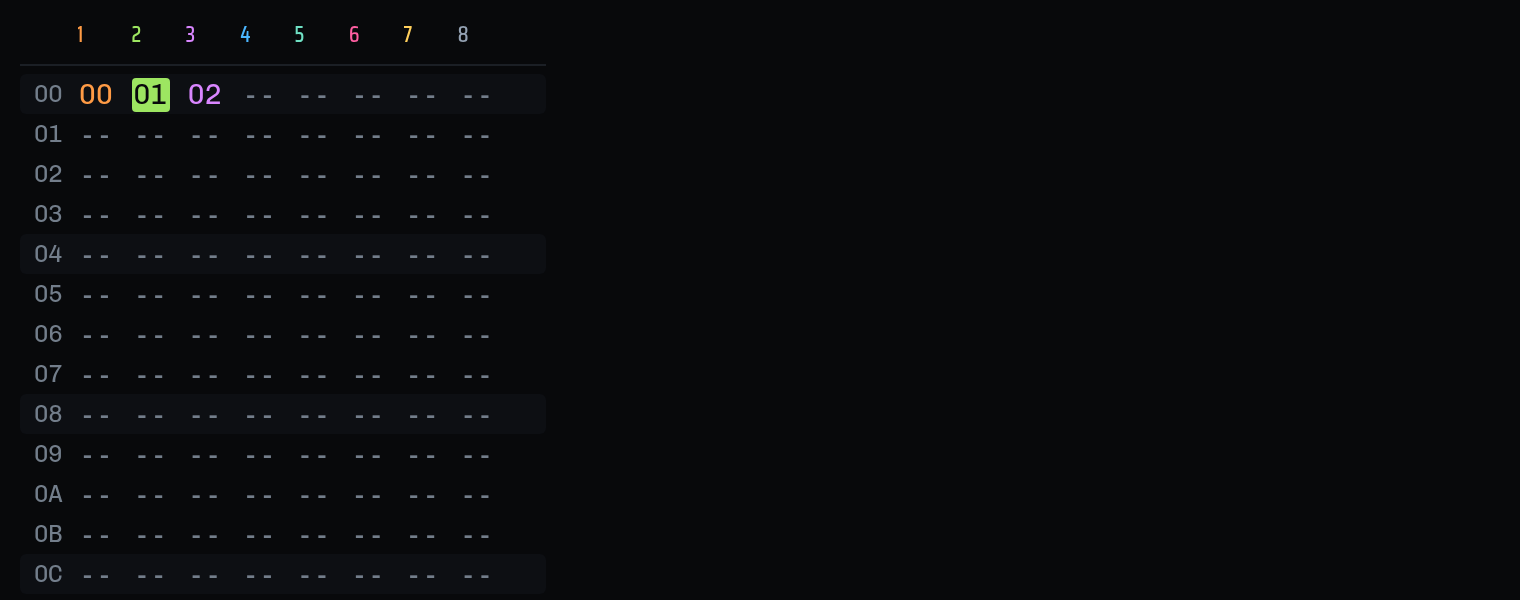
Eight columns, one per track; each cell is a chain number. A column plays from the top and loops at its first blank, so a track's length is its own: two bars of drums under three bars of bell only line up again every six. A cell drawn faint is a chain that plays nothing, or a row the column never reaches. The marks under the cells are the playhead, one per track, because eight tracks are eight different places.
CHAIN
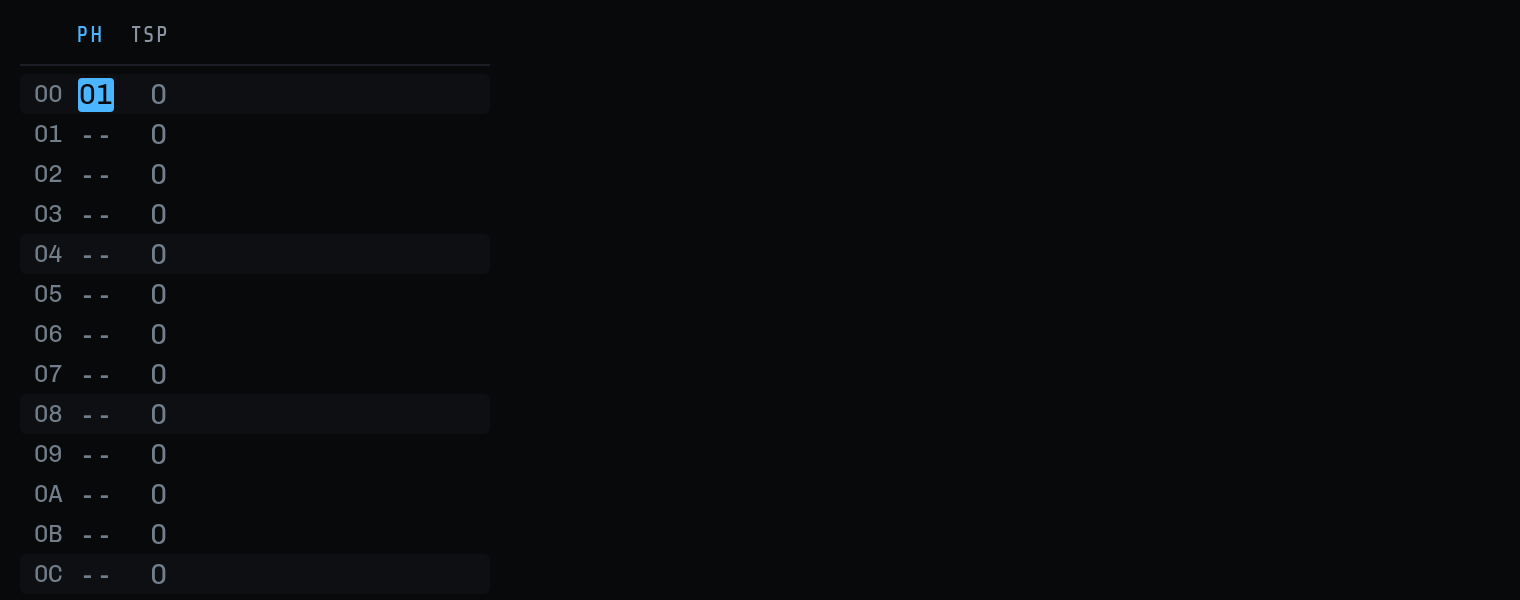
Sixteen slots of phrase number plus a transpose in semitones. A chain also ends at its first blank. The same phrase in four slots at four transposes is an arrangement written once.
PHRASE
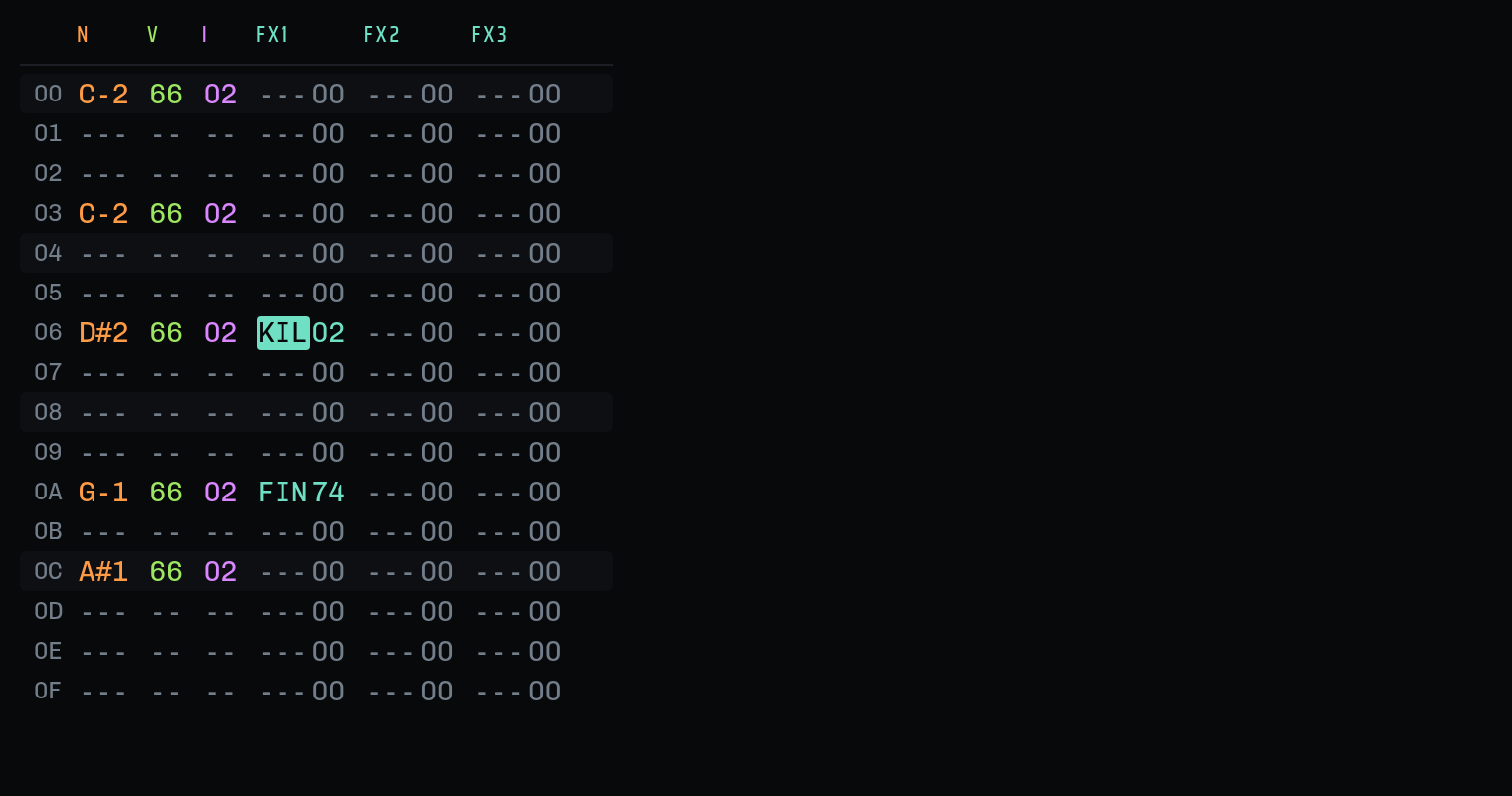
One track's sixteen rows, with the effect columns the pattern screen has no room
for. N is the note, V
the velocity (00–7F), I
the instrument, and FX1–FX3 the commands, each a
three-letter name and a two-digit value read as one token: KIL03. A
blank V or I carries on from the row above. A note with a number in I restarts the
instrument; a note with a blank I changes the pitch of what is already sounding,
which is how a legato line is written.
INSTRUMENT
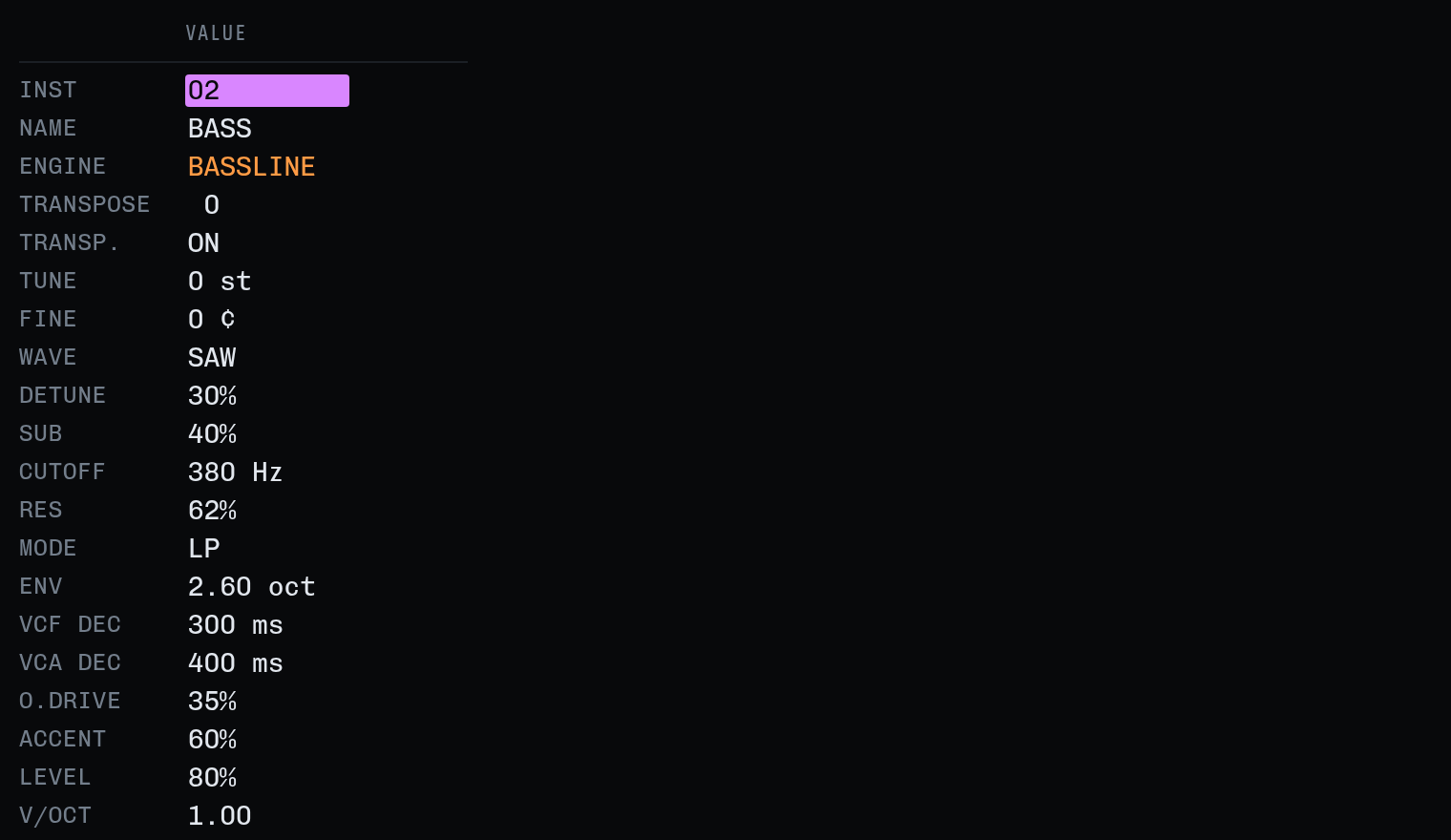
Which instrument slot, its name, which module makes its sound (ENGINE), its transpose, whether the song's transpose reaches it (TRANSP., off for a kit), and then every parameter the module has in the rack, formatted as the rack formats it. On the ENGINE row a letter picks the module whose name starts with it; Alt+Space plays a C-4 on it.
MIXER and PROJECT
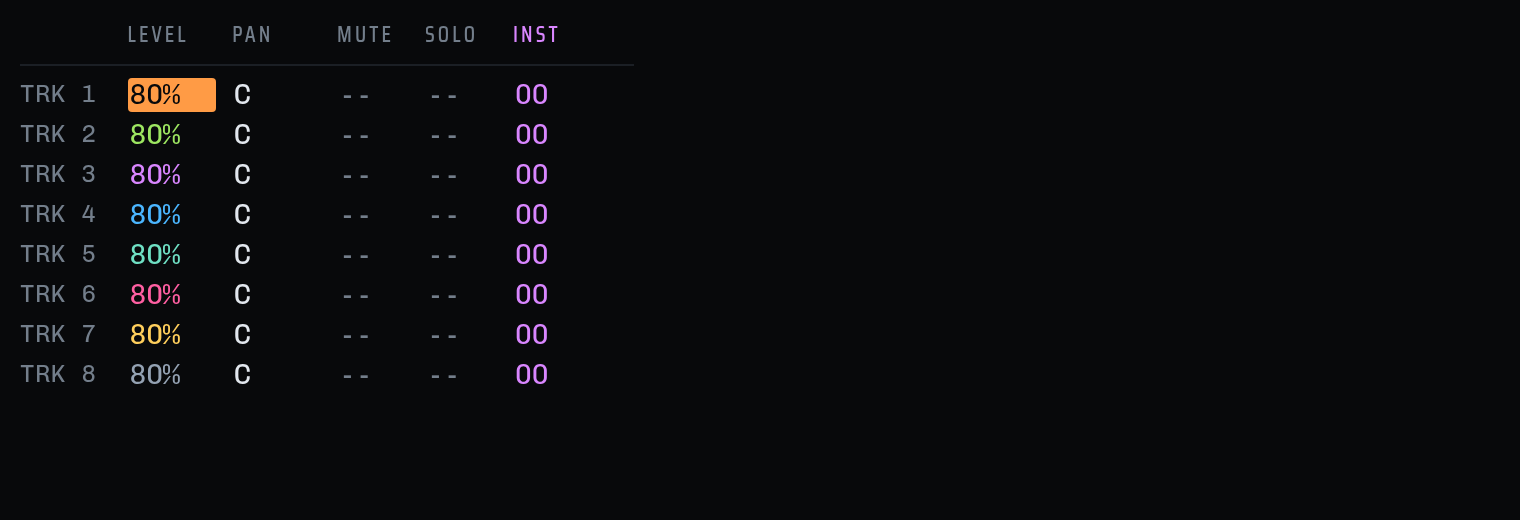
The mixer is level, pan, mute and solo per track, plus INST: the instrument a track falls back to when no row has named one, and Enter on it goes into that instrument. Solo is a performance setting and is not saved. PROJECT holds the song's name, tempo, swing and global transpose, the note-preview switch, CLEAR UNUSED (which forgets every chain, phrase and instrument nothing plays) and NEW SONG.
The keys
Direct typing where a keyboard has the keys the M8 does not, and the M8's own chords everywhere else. Press ? in the tracker for this card.
- ← ↑ → ↓move the cursor; PgUp/PgDn sixteen rows, Home/End to the ends
- Shift+arrowsbetween screens: Right goes in, Left comes out, Up and Down reach PROJECT and MIXER
- Alt+arrowsalong a screen: the next chain in this column, the next phrase in this chain, the next bar, the next track
- SpacePLAY, meaning what the screen means: the song from the cursor's row, this chain, this phrase. Again to stop
- Shift+Spacethe song from the cursor's row in it, from any screen. The masthead's PLAY button is always the whole song from the top
- Z…M, Q…Pnotes: two octaves of a piano, white keys on the home row and the row above, sharps on S D G H J and 2 3 5 6 7
- [ ]the octave the note keys play (shown as OCT in the masthead)
- - on a notea note-off (OFF)
- 0–9 A–Fhex, two digits at a time, in V, I and the effect values
- letters on an FX cella command: T then P is
TPO, K isKIL, PS isPSL; the same letter again cycles - X on a switchtoggles it: MUTE, SOLO, TRANSP., NOTE PREVIEW
- = - / + _nudge a value by one / by a lot, in whatever it is measured in
- Deleteclear; on an empty note it writes OFF, as the M8 does; on a command it leaves the value alone
- Entergo into what the cursor is on; on a blank cell, put back the last value used in that column
- Shift+Entera new unused chain, phrase or instrument, and into it
- Ctrl+Shift+arrows, or dragselect a block; Escape clears it, Delete empties it
- Ctrl+C X Vcopy, cut, paste. A paste lands at the cursor's row, in the columns the cells came from
- Ctrl+Dclone the chain, phrase or instrument under the cursor into a new slot; with Shift, a chain and every phrase in it
- Ctrl+Iinterpolate one selected column between its two ends
- Alt+M S 0mute or solo the cursor's track, or clear all; on the song screen plain M and S act on the column
- Alt+Spaceplay a C-4 on the instrument being edited
- ?this card, in the tracker
Typing a note plays it, on the instrument the row would use, while the song is stopped. It is the M8's NOTE PREVIEW and it is on by default; the PROJECT screen turns it off. A typed note also fills in its instrument column, as the M8 does, so it restarts that instrument rather than sliding into it. On a phone, where there are no keys, a pad of them appears under the grid.
Tutorial: a beat, a bass line and an arpeggio
Fifteen minutes from an empty song to a four-track loop: a kick, a hi-hat on its own track, a bass line with a slide in it, and an arpeggio. Every keystroke is written out, because the point of a tracker is that the keystrokes are the instrument. Have the tracker open beside this.
1. An empty song
Press Tab until you reach PROJECT (or click the tab), put the cursor on NEW SONG with End, and press Enter. You land on the PATTERN screen with one empty bar, and the masthead says untitled at 120 bpm. Click the name and type one if you like; Enter hands the keyboard back to the grid.
2. Three instruments
Go to the INSTRUMENT screen (click the tab, or Shift+→
from the pattern screen twice). The cursor is on the INST row, which says
00: instrument zero, which a new song always has.
-
↓ ↓ to ENGINE and press D. The row reads
DRUMSand the parameters below it change to the kit's. On an ENGINE row a letter picks the module whose name starts with it; the same letter again cycles through the others. -
↑ to NAME, Enter, type
KIT, Enter. -
↑ to INST and press =: the slot number becomes
01, and every row below it goes faint because nothing has been written into this slot yet. ↓ ↓ to ENGINE and press B twice: the first B isBASSLINE, the secondBASS. Name itBASS. -
Back to INST, = again for
02, ENGINE M forMACRO, name itARP. Further down, find DECAY and press - a few times to shorten it: an arpeggio wants notes that get out of each other's way. Alt+Space plays a C-4 on it so you can hear the difference as you turn it.
Every instrument page is the module's own panel read as a list. If you know what MACRO's MODEL or BASS's CUTOFF do in the rack, they do exactly that here, and = and - move each one along its own scale.
3. The kick and the hi-hat
Back to PATTERN (Tab to it, or Shift+← twice). Eight tracks across, sixteen rows down; the cursor starts on track 1's note column.
Press Z. The cell reads C-4, the instrument column beside
it fills in with 00, and you hear a kick: on DRUMS, C-4
is the kick, C#4 the snare, D-4 the clap, D#4 the closed hat, E-4 the open hat,
then the two toms and the rim, and the kit repeats every eight semitones.
↓ four times to row 04 and press Z again; then
rows 08 and 0C. Four on the floor.
Now the hat, on track 2, because a track plays one note at a time
— a hat on the same row as a kick needs a track of its own. Press
Home, then → three times to reach track 2's note column, and
press D: D#4, the closed hat, and the chain and the phrase
for that track are made as you type it. Then every other row: ↓
↓ D, down to row 0E.
To make the off-beats lighter, put the cursor on row 02 of track 2,
press → to the velocity cell and type 4 0; the
same on 06, 0A and 0E. Velocity is hex,
00 to 7F, and a blank one means "as above", so the rows
between carry on at full strength. Space plays the bar.
    1           2
00  C-4 -- 00   D#4 -- 01
01  --- -- --   --- -- --
02  --- -- --   D#4 40 01
03  --- -- --   --- -- --
04  C-4 -- 00   D#4 -- 01
…
4. The bass line
Home, then → to track 3's note column. Press [ twice: the masthead reads OCT 2, so Z is now C-2. Then:
- row
00: Z —C-2 - row
03: Z —C-2again - row
06: D —D#2 - row
0A: B —G-2 - row
0C: J —A#2
Each one fills its instrument column with the track's default, which is still
00, the kit — so set the instrument once and the rest follow:
put the cursor on row 00 of track 3, → twice to the
instrument cell, type 0 1, and clear the others with
Delete (a blank column carries the last one forward).
Two commands make it a bass line rather than a list of notes, and those live on
the PHRASE screen: press Enter anywhere in track 3 to go there. On row
03, → to FX1 and press K: KIL.
→ once more onto its value and type 0 2: the note
is cut dead two ticks in, a third of a row, so the repeated C is a stab. On row
0A, FX1 P S is PSL; give it
0 3 and the G slides up from the D# over half a row. The
help line under the grid says what the command and its value mean while the cursor
is on them.
00 C-2 -- 01 ---00 ---00 ---00
03 C-2 -- -- KIL02 ---00 ---00
06 D#2 -- -- ---00 ---00 ---00
0A G-2 -- -- PSL03 ---00 ---00
0C A#2 -- -- ---00 ---00 ---00
A row is six ticks, as on the M8, so 03 is half a row and
06 a whole one. DEL, KIL, OFF,
RET, ARP and PSL all count in them.
5. The arpeggio
Shift+← back out, then Tab to PATTERN and across
to track 4. Press ] twice to get OCT 4 back, set the instrument cell on
row 00 to 0 2, and write a C minor chord, one
note per two rows, up and down:
- row
00: ZC-4 - row
02: DD#4 - row
04: BG-4 - row
06: QC-5 - row
08: BG-4 - row
0A: DD#4 - row
0C: ZC-4 - row
0E: BG-4 - row
0F: - —OFF, so the last note stops before the bar comes round again
Space to hear all four tracks. Now the shortcut: an arpeggio can also
live inside a single row. Go into the phrase (Enter), put the cursor on
row 00, FX1, press A for ARP and give it
3 7. Within that row the note now cycles C, D#, G, one per
tick, without retriggering — a whole triad in a sixteenth. Put it on every
note and the line shimmers; take it off and it is plain again.
6. Together, and a second bar
Space on PATTERN or SONG plays every track. Alt+M mutes the cursor's track and Alt+S solos it; Shift+↓ is the MIXER, where - and = on LEVEL balance them and the MASTER slider in the masthead is the room's volume.
For a second bar, press Alt+↓ on the PATTERN screen: you are
now on slot 01 of every track's chain, which is empty, and typing
makes the phrases for it. To repeat what you already have instead, go to the CHAIN
screen for a track and press Enter on slot 01: it fills
with the phrase you last used there. Ctrl+D on that slot
clones the phrase into a new number so you can change the copy and leave bar one
alone. The TSP column beside a slot transposes it in semitones, which is how one
phrase becomes a chord progression.
Tracks do not have to be the same length: a column of the SONG screen plays down to its first blank and then loops, so two bars of drums under three of bass drift against each other and only line up again every six. Three Against Two in the examples is built on nothing else.
7. Keep it
SAVE stores the song in this browser under a name; the picker
lists it under Saved from then on, and the tracker also autosaves wherever
you are. SHARE copies a link that carries the whole song in the
part after the #, which browsers never send anywhere.
The effect columns
The M8's names and the M8's units. Every command acts on the row it is written on,
except TSP, which holds from its row on, and TPO, which
changes the transport. Type letters to name one and two hex digits for the value;
the help line spells out what the pair means.
| Command | Value | What it does |
|---|---|---|
VOL | 80 is as written | scales the row's velocity; two of them multiply |
FIN | signed around 80 | fine tune in cents |
PIT | signed around 80 | pitch offset in semitones, this row only |
TSP | signed around 80 | transposes the track from this row on |
DEL | ticks, up to 5 | delays the row |
KIL | ticks; 00 is now | cuts the sound dead. Works on every instrument, including a ringing MODAL or STRING |
OFF | ticks | closes the gate, so the instrument releases |
RET | XY | retrigger every Y ticks; X ramps the level, 8 is flat. X0 is one retrigger after X ticks |
ARP | XY | cycles the note, +X and +Y semitones, one per tick, without retriggering |
PSL | ticks | slides into this note from the last one |
INS | instrument | plays the row on that instrument, whatever the column says |
CHA | 00–FF | plays the row that fraction of the time. Decided by where the row is in the song, so everybody who plays the song hears the same choices |
HOP | 0Y, or FF | ends the phrase here; the next starts at row Y. FF stops the track after this row |
TPO | bpm, in hex | sets the tempo. 8C is 140 |
HOP 00 on row 07 is an eight-row phrase; that is the M8
idiom for anything shorter than sixteen rows, and it works here because where a
phrase ends is written in the phrase rather than remembered while playing.
Saving, sharing and files
SAVE keeps a named song in this browser, in a list beside the
examples; the autosave, separately, is wherever you currently are, and each tab
keeps its own so a reload comes back to what that tab had. SHARE
puts the song on the clipboard as a link. EXPORT writes a readable
.json and IMPORT reads one back — the answer for
a song too long for a link, and for keeping one somewhere that is not a browser.
Saved songs live in one browser; export or share is how one travels.
Into the rack
TRACKER is a module in the synthesizer. It plays a song onto sixteen
jacks, pitch and gate for each of eight tracks, so a written part can drive
whatever you patch it into: a MACRO through a filter and a delay, a
QUANT that forces the line into a scale, an envelope on something
that has none. The gate carries the row's velocity as its height, so the drum
modules read it as an accent.
The button at the end of the toolbar says what it can do right now.
OPEN IN RACK opens the synthesizer in another tab with a
TRACKER already playing this song. If a rack tab is already open, it
reads SEND TO RACK, and the two tabs talk directly: the rack adds
a TRACKER that follows this tab, so every edit you make here
plays there a moment after you type it, and the button reads
LIVE IN RACK. On the rack's side, the module's picker lists every
open tracker tab to follow, and its EDIT button sends the module's song back here.
The instrument column is ignored in the rack, deliberately: there the sound is whatever the jacks are wired into, which is the reason to bring a song over at all. (A row naming an instrument slot that does not exist is a rest in both, so the two agree about what plays.) The whole song is stored in the patch, so it travels in the rack's share links too.
Differences from the M8
- Values are typed straight in. The M8 has no digits, so it edits by holding EDIT and moving; here = and - do that and the digits do the rest.
- The PATTERN screen is not an M8 idea: its panel has no room for eight tracks at once, and a browser window does.
-
Playing never counts. Where the song is at any moment is worked out from the
transport's position, so a tab that was in the background for a minute comes back
on the right row rather than a minute behind. The one thing that costs is that
a track always enters its first phrase at row 0, even after a
HOPto another row at the end of the last one. - No tables, grooves or scales, and no note range below C-0. Swing is one global amount rather than a per-track groove.
CHAis one byte rather thanXY.-
Velocity is a gain between the module and the track, not the instrument's own
amplitude, because a rack module's gate is an edge rather than a level; and
KILis that gain closing in a few milliseconds. - An instrument is a synthesizer module, never a sample.